DXPR: Drupal dropdown menus: how to build them in Drupal 11
A dropdown menu in Drupal 11 always starts in the same place: the core menu system, where you nest links under a parent. What turns that structure into a dropdown is either your theme or a menu module. This post walks through both routes, shows what the result looks like on desktop and on a phone, and compares the menu modules that are maintained for Drupal 11 today.
The screenshots come from a Drupal 11.4 site with DXPR Theme 8.2.2, taken in October 2026; the module details come from drupal.org on 23 October 2026.
In short: build the menu under Structure, Menus, nest the links, and tick Show as expanded on every parent. A theme with dropdown support, such as Olivero (one dropdown level) or DXPR Theme (three levels, automatic columns), then renders the dropdowns. Add a module such as Superfish or The Better Mega Menu only when the theme cannot do what you need.
Let an AI agent build the menu. A menu is a list of links with a hierarchy, the kind of structured task a coding agent does well. With the Drush Webmaster skill, an agent creates and orders the menu links from a short brief, and with DXPR Theme's agent skill it sets the header layout and menu colors to match the brand. You review the result on the site.
1. Create the menu structure in Drupal coreGo to Structure, Menus, and edit the menu that sits in your header, usually Main navigation. Add the links with Add link, then drag each child under its parent so it indents one level, and press Save.
Next, edit every parent link and tick Show as expanded. Without it, Drupal only renders a parent's children on that parent's own page, so the dropdown stays empty everywhere else. To expand every parent at once, tick Expand all menu links in the settings of the menu block instead. For a parent that should only open its dropdown, enter <button> or <nolink> as the link instead of a page.
2. Let the theme render the dropdownsMost current Drupal themes turn a nested menu into dropdowns on their own; how deep they go and how the dropdown looks differs per theme.
- Olivero, Drupal core's default front-end theme up to Drupal 11.4, places its main menu block with a depth of two: the top level plus one dropdown level, with a button next to each parent.
- DXPR Theme renders three levels. A dropdown with 8 or more links splits into columns, and from 15 links it spans the full width of the header, which gives you a mega menu without a module. On a mouse, dropdowns open on hover, and when any dropdown has a third level they open on click. Below the mobile breakpoint, 1200 pixels by default, the menu folds into a hamburger menu that expands each level in place. The mega menu guide covers every setting.
A module makes sense when the theme cannot render what you need, for example images or blocks inside the dropdown, or a separate off-canvas menu for phones. These are the maintained options for Drupal 11:
ModuleWhat it doesLatest stable releaseReported sites Superfish Dropdown MenuDropdowns from the jQuery Superfish plugin, with multi-column sub-menus and right-to-left support; needs the Superfish library in /libraries8.x-1.17, 16 Oct 2026, Drupal 9 to 1164,556 The Better Mega MenuAn admin interface for dropdowns that combine menu links with images, videos and blocks8.x-1.10, 28 Aug 2025, Drupal 8 to 1118,522 Responsive and off-canvas menuA horizontal menu on wide screens and an off-canvas menu on phones, through the mmenu library4.4.5, 4 Feb 2025, Drupal 9.3 to 1110,647 Drupal Mega MenuA drag-and-drop mega menu builder with layout styles and animations; minimally maintained8.x-1.17, 22 Sep 2026, Drupal 10.3 and 115,067 Simple Mega MenuFoundations for a mega menu you build yourself with Twig and content entities2.2.0, 9 Sep 2024, Drupal 10.3 and 111,655To show only part of a menu elsewhere on the page, for example the children of the current section in a sidebar, core's menu blocks have Initial visibility level and Number of levels to display settings, and the Menu Block module adds options such as rooting the block at a specific menu item.
Which option should you pick?- Links only, one dropdown level: core menus and your theme, nothing to install.
- Three levels, columns or a full-width mega menu, and a mobile menu: a theme that renders them, such as DXPR Theme, so the menu stays plain Drupal configuration.
- Images, videos or blocks inside the dropdown: The Better Mega Menu or Drupal Mega Menu. Each one adds its own configuration screen and markup to maintain.
- A dedicated off-canvas menu on phones: Responsive and off-canvas menu.
Nest the child links under their parent in Structure, Menus, save the menu, and tick Show as expanded on each parent link. A theme with dropdown support, such as Olivero or DXPR Theme, then shows the children as a dropdown. If your theme does not, add a module such as Superfish.
Why does my Drupal menu not show its dropdown?Usually because the parent link does not have Show as expanded ticked, so Drupal only renders its children on the parent's own page. Ticking Expand all menu links in the menu block's settings fixes that for every parent at once. The other common cause is the block's Number of levels to display, which limits how deep the block renders; a value of 1 hides every dropdown.
Can a Drupal dropdown menu contain images or blocks?Not with core menus alone: a core menu holds links. Mega menu modules such as The Better Mega Menu and Drupal Mega Menu let you place images, videos and blocks inside a dropdown. Many sites keep the menu to links and put that content on the landing pages the menu leads to, which is easier to maintain and to translate.
How do dropdown menus work on phones?Responsive themes fold the menu behind a hamburger icon below a breakpoint and open each level on tap; DXPR Theme does this below 1200 pixels by default, and the breakpoint is a theme setting. For a separate off-canvas menu on phones, the Responsive and off-canvas menu module adds one through the mmenu library.
Can AI build my Drupal menu?Yes. With the Drush Webmaster skill installed, a coding agent such as Claude Code creates, nests and orders menu links from a brief, and with DXPR Theme's agent skill it also sets the header layout and menu colors. A person reviews the result on the site before it goes live. See the DXPR agent skills.
A mega menu without a module.DXPR Theme turns your Drupal menu into multi-level dropdowns, full-width mega menus and a mobile menu, styled from its settings. Try it in the live demo or read the step-by-step guide.
Try Live Demo Read the mega menu guideDXPR: Drupal 11 Layout Builder tutorial: sections, blocks and overrides
Layout Builder is Drupal's own page layout tool. It ships with Drupal 11 core, it works on any content type, and it lets a site builder define a default layout once and let editors adjust the layout of a single page when they need to. This tutorial walks through the whole thing on Drupal 11.4: enabling the module, giving a content type a layout, adding sections and blocks, saving the default, overriding it on one page, and the two contributed modules that make it workable for editorial teams.
Every screenshot was taken on a Drupal 11.4 site in October 2026, with Claro as the administration theme and DXPR Theme on the front end. Layout Builder opens in the front-end theme, so on your site its buttons and tray may look slightly different.
Layout Builder gives you the frame. AI fills the page.Layout Builder arranges blocks in regions. It does not write the headline, the three feature cards or the call to action, and it will not draft the Dutch version. That part of the work is where most of the time goes, and it is what DXPR Builder adds inside your Layout Builder layouts.
DXPR Builder runs as a formatter on a text field, so a DXPR Builder field sits inside a Layout Builder section like any other block. Layout Builder keeps the overall page structure; inside the field, an editor describes the page in a brief and gets an editable draft with sections, text, images and buttons, then refines it in the visual editor or by asking for changes in context. Translations start as AI drafts for a local editor to review. Nothing publishes on its own; the page goes through the permissions and moderation your site already has.
The free Personal plan includes DXPR Builder and 10,000 AI credits a month for one production website. Compare DXPR Builder with Layout Builder in detail, or see how it fits an existing Drupal platform.
Try it inside a layoutThe live demo is a Drupal site with Layout Builder, DXPR Builder and AI switched on. Build a page from a brief inside a Layout Builder section and keep the result. How AI page building works.
Try Live Demo 1. Enable Layout BuilderGo to Extend (/admin/modules), filter on "layout" and tick Layout Builder. Drupal enables Layout Discovery with it: the module through which core, contributed modules and themes register layouts. From the command line, drush en layout_builder does the same.
Leave Layout Builder Expose All Field Blocks switched off. It is deprecated, and it offers every field of every entity type as a block, which slows down sites with many content types.
2. Turn it on for a content typeOpen Structure, Content types, your content type, Manage display, and pick the view mode; Default covers full pages. Under Layout options, tick Use Layout Builder. Tick Allow each content item to have its layout customized as well if editors may change the layout of a single page; leave it off for content types that must stay uniform. Overrides are only offered on the Default or Full content display.
After saving, the field table disappears: from now on the display is a layout, and the Manage layout button opens it.
3. Open the default layoutManage layout opens the layout every page of this content type shares. Drupal starts it with one section that holds the fields that were visible on the display, each as a block: here Featured image, Moderation control, Content and Tags. With Show content preview off, blocks show their labels instead of sample content, which makes arranging them easier.
The editor opens in your front-end theme, so its buttons take the theme's look (DXPR Theme in these screenshots). Nothing is stored until you press Save layout; Discard changes throws the draft away.
4. Add a section and choose its layoutClick Add section above or below an existing section. The tray on the right lists every layout registered on the site: core's one, two, three and four column layouts, plus the layouts your theme and modules add. The DXPR layouts in this screenshot, in fluid and container variants, come from the DXPR CMS Layouts module.
Pick a layout and Configure section asks for its settings. For core's two column layout these are the column widths (50/50, 33/67, 67/33, 25/75 or 75/25) and an optional administrative label that only site builders see. Press Add section. When the blocks of the old one-column section have a new home, remove that section with the cross next to its Configure Section link.
5. Add blocks to the regionsEvery region of a section has an Add block link. The Choose a block tray lists the fields of the content type under Content fields, then the blocks of every module: menus, views, forms and custom blocks. Create content block at the top makes a one-off inline block that belongs to this layout. Type in Filter by block name instead of scrolling.
Each block has a short configuration form. A field block asks for the label position and the formatter; most other blocks ask for a title you can show or hide. In this example the Content field goes in the wide column with its label hidden, and the Main navigation menu goes in the narrow column with the title "Explore the faculty".
When the section holds the Content field next to the menu, press Save layout, and every page of the content type uses this layout.
6. Override the layout of one pageWhen the content type allows overrides, every page gets a Layout tab next to View and Edit. It opens the same editor for that page only, with a Revert to defaults button above the layout. Here the annual report gets an extra Search block under the menu; every other page of the content type keeps the default layout.
From that moment the page has its own copy of the layout. Later changes to the default no longer reach it, until someone presses Revert to defaults.
7. Two contributed modules every editorial team ends up installingCore Layout Builder offers every layout and every block to every editor, which is more freedom than most teams want. Two contributed modules close the gap:
- Layout Builder Restrictions limits which layouts and which blocks are available per content type and per region, so an editor picks from the handful of options that fit the design.
- Layout Builder Styles lets a site builder define named styles (a background, a spacing variant, a width) that editors apply to a section or a block from a dropdown instead of writing CSS classes.
Install either with Composer, enable it, and its settings appear under the content type's Manage display and in the Layout Builder tray.
8. Things to know before you roll it out- Overrides are stored on the node. Once a node has its own layout, changes to the default layout no longer reach it until someone presses Revert to defaults. Decide early which content types allow per-node overrides.
- Inline blocks live in the layout. A custom block created inside Layout Builder belongs to that node's layout and is not reusable elsewhere; use a block from the Block library when several pages need it.
- Permissions. Overrides have a permission per content type, for example Content - Article: Configure layout overrides for content items that the user can edit, or the wider Configure all layout overrides. Configure any layout also covers the default layouts, so keep it for site builders.
- Revisions and moderation. Layout changes are part of the node revision, so content moderation applies to them like to any other field; editors can save a draft layout and publish it later.
- Themes. Layout Builder offers the layouts registered by core, your theme and your modules. Core's layouts bring their own CSS and work in any theme; modules such as DXPR CMS Layouts add Bootstrap 5 layouts in fluid and container widths.
Planning a site that needs more than core? Talk to Sales.
Is Layout Builder part of Drupal core?Yes. Layout Builder has been a stable core module since Drupal 8.7 and ships with Drupal 10 and Drupal 11, together with Layout Discovery. You enable it on the Extend page; there is nothing to download.
Does DXPR Builder replace Drupal Layout Builder?No, the two work together. DXPR Builder runs as a formatter on a text field, so you can place a DXPR Builder field inside your existing Layout Builder layout. Layout Builder keeps control of the overall page structure while editors build visually inside the field. Compare DXPR Builder and Layout Builder.
Layout Builder or Paragraphs?Layout Builder arranges blocks in regions and is best for the overall structure of a page and for layouts shared by a whole content type. Paragraphs models repeatable content components as fields and is best for structured editorial content that must stay consistent. Many sites use both: Layout Builder for the page frame, Paragraphs or DXPR Builder for the content inside it. Compare DXPR Builder with Paragraphs.
Can AI build Layout Builder pages?The layout itself stays a human decision, and that is fine: a default layout is set once. The content inside it is where AI helps. With DXPR Builder in a Layout Builder section, an editor briefs the AI and gets an editable draft of the page content; with the DXPR agent skills, a coding agent builds the page from a brief and hands it to an editor. How AI page building works.
Do editors need training to use Layout Builder?Some. The section and block model is simple once seen, but the tray, the block configuration forms and the difference between the default layout and an override are not obvious. Restrict the layouts and blocks to the ones that fit your design, give editors a short walkthrough like this one, and consider a visual editor for the content inside the layout.
Next stepSet up Layout Builder on one content type, restrict it to the layouts your design needs, and put a DXPR Builder field inside it for the content. Your editors get a fixed frame and a visual, AI-assisted editor inside it.
Try Live Demo Compare with DXPR Builder Drupal Layout Builder DXPR Marketing TeamDXPR: Drupal website examples: 16 sites running on Drupal in 2026
Drupal runs some of the busiest public websites in the world, and most of them do not look like each other. That is the point of this list. Every site below runs Drupal today, checked on 23 October 2026 against the markup the sites serve, and together they cover universities, governments, global manufacturers, biotech, security companies and libraries.
Most of them are DXPR customers, so for those we can tell you what was built, not only what it looks like: the team behind it, the problem they solved and, where the case study states them, the numbers. A few well-known Drupal sites are included for breadth. Where the old version of this article listed sites that have since moved to other platforms, they are gone; Drupal website examples are only useful when they are current.
How pages like these get built in 2026: with AI, inside Drupal.Every site on this list has an editorial team that publishes without a developer in the loop. In 2026 that team starts a page with a brief.
DXPR Builder turns a brief into an editable page: describe the audience, the message and the page structure, then shape the result in the visual editor. The draft is normal DXPR Builder content, so an author can rewrite a headline, move a section or swap an image without touching AI again. Translations start as AI drafts and finish with a local editor, with Drupal keeping the language editions connected. Nothing publishes on its own: the page goes through the permissions and moderation your Drupal site already has.
The free Personal plan includes DXPR Builder and 10,000 AI credits a month for one production website, with no card and no time limit. Teams that work with a coding agent can go further with the DXPR agent skills: the agent builds pages, configures the theme and sets up Views from a brief, and hands the result to a human editor.
See it on a site of your ownThe live demo gives you a Drupal site with DXPR Builder, DXPR Theme and the AI features switched on. Build a page from a brief and keep the result. How AI page building works.
Try Live Demo 1. SynapticsSynaptics, headquartered in San Jose, California, makes the touch, display, biometrics, video, audio and speech technologies that sit between people and their devices. The corporate site is a semiconductor catalogue and a newsroom in one: a hero carousel for the current whitepaper, a dated news row, and product navigation grouped under Products, Applications, Support, Careers and Company, in English with a Simplified Chinese edition. The server announces itself as Drupal 10.
The marketing team runs the site on DXPR Builder, with DXPR Theme holding the brand, and publishes product launches, security content and campaign pages without an IT ticket. The case study counts 369 pages across the technical portfolio and twelve editors. Visit synaptics.com or read the Synaptics case study.
2. HackerOneHackerOne runs the largest community of security researchers and combines it with AI to find and fix vulnerabilities across the development lifecycle. Its marketing site is the classic security-platform layout done well: a dark hero with two calls to action, a logo strip of customers (GM, IBM, PayPal, Shopify, Snap, TikTok), and navigation for Platform, Solutions, Partners, Researchers, Resources and Company, with a Leaderboard and a "Contacted by a hacker?" link for the people who matter most to a bug bounty company. The markup serves its files from Drupal's /sites/default/files/.
Marketers assemble campaign pages from reusable DXPR Builder sections and preview them before review; the case study puts the customer base at 1,300+ organizations. Visit hackerone.com or read the HackerOne case study.
3. SWARCOSWARCO is an Austrian group with more than 50 years in mobility management and road safety, from traffic signals to the glass beads in road markings. The group site publishes twelve language editions (Czech, Danish, German, English, Spanish, Finnish, French, Hungarian, Dutch, Norwegian, Romanian and Swedish) and sends visitors to their language by location; Drupal Commerce is installed alongside. The server reports Drupal 10.
DXPR Builder runs across the subsidiary sites on one shared Drupal platform, with DXPR Theme keeping the group identity while regional editors publish product pages and news in their own language: 7 brands, 6 countries and 13 editors at the time of the case study. Visit swarco.com or read the SWARCO case study.
4. Vanderbilt University Medical CenterVUMC in Nashville, Tennessee, is home to the region's Level I trauma centre and a top-ranked children's hospital. Its homepage is a hub for everyone who deals with the medical centre: patients, referring providers, job seekers, donors and staff, with a news hero, price transparency and employee resources in the navigation, and quick tiles to the resources directory, email and MyWorkday. The server reports Drupal 10.
Five department websites, from internal medicine to dermatology, run DXPR Builder inside VUMC's Drupal estate, with DXPR Theme enforcing the identity so clinical faculty and communications staff publish without IT support. One handbook alone holds 306 clinical topics across 26 specialties. Visit vumc.org or read the VUMC case study.
5. Universidad de los AndesColombia's Universidad de los Andes describes itself as an autonomous, innovative university built on critical and ethical education, with more than 14,000 students. The Spanish-language site leads with an admissions bar for the next intake, a news hero and navigation for the university, its academic offer, admissions, research and academic life. It is one of the Drupal 11 sites on this list.
The engineering faculty websites run DXPR Builder, so department coordinators publish programme pages, research showcases and faculty profiles within the university's brand framework, across three or more faculty sites. Visit uniandes.edu.co or read the Universidad de los Andes case study.
6. WHO Regional Office for AfricaThe World Health Organization's Regional Office for Africa serves 47 Member States, and its portal is built for emergencies: the hero carries the current outbreak story, the navigation covers health topics, countries, the newsroom, emergencies and data, and every country has its own page. It publishes in English, French and Portuguese on Drupal 10.
DXPR Builder brings visual page production into the site, where saved layouts give the next bulletin its structure while Drupal's permissions keep review with the health specialists. Visit afro.who.int or read the WHO Africa case study.
7. Veolia Water Technologies UKVeolia Water Technologies' UK team draws on a portfolio of more than 350 water treatment technologies, and its country site sells them to engineers: a six-slide hero, an "Explore Water Treatment" tile section, customer services, careers, news and resources, and an online shop, all on Drupal 10.
With DXPR the team brings a buyer's water problem, the proposed solution and the useful resources together on one page, and adapts that structure to other sectors without commissioning a new layout each time. Visit veoliawatertechnologies.co.uk or read the Veolia case study.
8. Vicat GroupVicat is a French, family-run cement manufacturer founded more than 165 years ago, with an international footprint. The corporate site runs in French and English on Drupal 11, with a live stock ticker in the header, a "You are" audience selector and news tagged by publication, innovation and finance.
The DXPR story at Vicat is its three product-brand sites, Solutions Vicat, Décoffrage and Chape Vicat, which share one Drupal platform with DXPR Builder and DXPR Theme so the product teams publish technical content and service pages on their own. Visit vicat.com or read the Vicat case study.
9. ArtecheThe Arteche Group has 75 years in the electric power industry and a catalogue of instrument transformers, relays, protection and measurement equipment and substation automation, with its equipment in more than 150 countries. The site is deliberately quiet, a logo, a hamburger menu and a two-slide mission hero, and runs in German, English, Spanish, French and Portuguese on Drupal 10.
Every page of the five language editions is built visually with DXPR Builder under one brand, with the same Builder-built hero structure carried across the editions. Visit arteche.com or read the Arteche case study.
10. FONPLATAFONPLATA is the development bank of the River Plate Basin, formed by Argentina, Bolivia, Brazil, Paraguay and Uruguay and headquartered in Santa Cruz de la Sierra. Its site speaks Spanish, English and Brazilian Portuguese, with a country hero carousel, a latest-news row and per-country operations pages, served from Drupal's files directory.
The communications team publishes institutional news, investor information and country operations from one Drupal platform built with DXPR Builder and DXPR Theme, assembling country heroes, news cards and listing pages visually. Visit fonplata.org or read the FONPLATA case study.
11. Nucleus FinancialNucleus is one of the UK's leading independent groups for investment platforms, products and wealthtech software, with more than 160,000 underlying customers and 5,000 advisers. The site splits by audience the moment you arrive: a top bar for advisers and for customers, a hero for the new Nucleus platform, and two large entry cards, "I'm an Adviser" and "I'm a Customer". Drupal 10, with a platform login kept separate.
The Edinburgh marketing team publishes adviser and customer content with DXPR Builder, preparing and reviewing pages on staging before release to the live site. Visit nucleusfinancial.com or read the Nucleus case study.
12. City of Los Angeles, Bureau of Contract AdministrationThe Bureau of Contract Administration is the City of Los Angeles's inspector for construction in the public realm and administers the city's business certifications. The site is a service desk: the official city banner, a Google Translate menu, navigation for contracting, inspection and wage standards, and four featured services, from Raise The Wage LA to requesting an inspection. It runs on Drupal 11.
With Drupal and DXPR the service owners maintain the certification, inspection and wage-information pages themselves, grouping requirements, documents and application links on a repeatable service-page layout. Visit bca.lacity.gov or read the City of Los Angeles case study.
13. City of BostonBoston.gov is the model many city portals copy: a plain "welcome" hero, information and services first, public notices, and a daily status strip for City Hall hours, trash and recycling, street cleaning, parking meters and the tow lot. It publishes in nine languages, from Spanish and Haitian Creole to Vietnamese and Simplified Chinese, on Drupal 10.
Not a DXPR site, but a good answer to anyone who asks whether Drupal can run a city. Visit boston.gov.
14. State of GeorgiaGeorgia.gov calls itself the starting place for living, growing and thriving in the Peach State. The portal leads with a services A-Z, how-to guides, an organizations directory and a panel of the most-accessed services, SNAP benefits first, under a photo of the gold-domed Capitol. Drupal 10.
State portals are where Drupal's structured content earns its keep: hundreds of agencies, one search, one design. Visit georgia.gov.
15. European CommissionThe European Commission's site is Drupal at the scale of a continent: 24 language editions, from Bulgarian to Swedish, a common header from the Europa Component Library, and navigation for priorities, news, topics and resources. The root sends you to a language choice first; the English edition reports Drupal 11.
If your question is whether Drupal handles multilingual publishing, this is the reference site. Visit commission.europa.eu.
16. UNICEFUNICEF works in the world's toughest places to reach the most disadvantaged children. Its global site publishes in English, French, Spanish, Arabic and Chinese, with a press centre and a donate button never more than a glance away, and a full-width story hero that changes with the news. The pages are served from Drupal's files directory.
Five scripts, including right-to-left Arabic, on one platform, with the same editorial team behind every edition. Visit unicef.org.
What these Drupal websites have in common- Structured content, not pages. Programmes, products, publications, events and people are content types with fields, and the listings, filters and feeds are Views over that content. It is why these sites can grow to thousands of pages without losing their shape.
- Many languages, one site. Several of the sites publish in two or more languages from one Drupal installation, with every translation connected to its source.
- Editorial teams in control. Permissions, moderation and revisions are part of Drupal core, so a department or a regional team can publish within rules the organisation sets once.
- Public-sector and accessibility requirements. Governments, universities and health organisations choose Drupal for its accessibility track record and its security process, and several sites here are exactly that kind of organisation.
Have a project in mind? Talk to Sales.
How can I tell whether a website runs Drupal?Look at the page source. Drupal sites usually send an X-Generator: Drupal header or a <meta name="Generator" content="Drupal …"> tag, load files from /sites/default/files/ and scripts from /core/, and carry data-drupal- attributes in the markup. That is how every site on this page was checked.
Is Drupal still a good choice for a new website in 2026?Yes, for sites with structured content, several languages, editorial workflows or compliance requirements. Drupal 11 is the current major version, Drupal CMS packages a ready-made setup for marketing teams, and with DXPR Builder the editing experience is visual and AI-assisted. For a five-page brochure site it is more than you need.
Can a marketing team build pages like these without developers?Yes. The content model, theme and permissions are set up once, usually by a developer or an agency. From then on, pages are built by the people who own the message: with DXPR Builder they drag sections, text, images and buttons into place, or start from an AI draft and refine it. Several of the case studies linked above describe exactly that handover.
Is Drupal free?Drupal is open source under the GPL, as are DXPR Theme and the thousands of modules and themes on drupal.org. You pay for hosting, for the people who build and run the site, and for optional services such as DXPR Builder's paid plans. The free Personal plan covers one production website.
Build the next oneIf one of these sites looks like the one you need, the quickest way to find out is to build a page: the live demo gives you a Drupal site with DXPR Builder, DXPR Theme and AI in place. If you already have a Drupal site, add DXPR Builder to it without replacing your platform.
Try Live Demo View Plans Drupal Community DXPR Marketing TeamStuart Clark (Deciphered): Druxt 0.25.0; caching and performance buffs
Druxt is the Fully Decoupled Drupal framework for Nuxt 2, and 0.25.0, the first Druxt release since 2023, makes it ask Drupal a lot less.
On druxtjs.org, the Druxt docs site, a page render made 17 requests to Drupal. On 0.25.0 it makes 11, and with content caching on it makes none, until Drupal's lifetime for the page runs out. The Nuxt server keeps what Drupal sends for as long as Drupal's Cache-Control allows, and a webhook clears it when content changes.
Separately, the first-load flicker is gone, and with schema.refresh on, a change in Drupal's Manage display shows up without a rebuild, which is the part I have wanted for years. The upgrade command is near the end.
Drupal Association blog: After the PHP security release: auditing your Drupal sites
First things first: if you have not yet updated PHP to 8.5.12, 8.4.27, 8.3.36 or 8.2.35 (or your host's or distribution's patched build), do that right away. See PSA-2026-10-20 from the Drupal Security Team and the PHP project's security advisory. Updating is the only complete fix for CVE-2026-109618 and CVE-2026-109619, and a configuration change or web application firewall rule does not replace it.
It feels like the whole internet has come together to address this PHP vulnerability. It is rare to see that much coordinated effort, and that much care and collaboration.
This post is about what comes after the update. On 21 October, Amazon Threat Intelligence reported that its honeypots recorded an exploitation attempt on 17 October, four days before the vulnerabilities were public, and further attempts in the hours before the fix was released. Amazon does not know whether those early attempts would have worked against real systems. But it means a site that updated promptly on 21 October was still exposed for several days beforehand, and a site that updated later was exposed for longer. Patching closes the door; it does not tell you whether anyone came through it first.
These vulnerabilities are in PHP itself, not in Drupal, so there is no Drupal-specific signature to look for, and no single checklist that fits every site.
Here is how the Drupal Association is handling it for Drupal.org: we updated, and we are now auditing our own infrastructure for signs that anything reached us before the update. In doing that research we have assembled the checks below, the help from an LLM. Not every one of them applies to every site, and which ones should be run depends on the host, but this is what our reading of the advisories and the published threat intelligence leads us to believe site owners should consider, whether they manage their own servers or want to ask their host the right questions. None of these findings is proof of compromise on its own. What you are looking for is several of them clustering around the same time or the same visitor.
Keep the evidence before you lookThe audit window starts on 17 October 2026. Before you redeploy or rebuild a server you want to examine, copy its web server, PHP-FPM and system logs somewhere safe. If you run in containers, a redeploy discards everything inside the old container, so capture it first (docker diff or docker commit on the running container) and only then roll the new image.
Where to look Web server and proxy logsStart with the simplest check. Amazon published six source addresses in its report:
- 103.216.220.92 (seen 17 October)
- 31.223.184.166 (seen 21 October)
- 37.19.200.5 (seen 21 October)
- 134.209.159.64 (seen 21 October)
- 103.114.163.188 (seen 21 October)
- 95.217.98.37 (seen 21 October)
Search your access logs from 17 October onward for any POST, PUT or PATCH request from those addresses. They belong to shared anonymisation services, so a match is a reason to look harder at that server rather than proof of anything, and no match proves nothing either; a honeypot sees a sample of attackers, not all of them.
Then look at request shape. One of the two bugs is reached through multipart form uploads, so what you are looking for is a run of multipart POST requests from a single visitor to a page that does not normally receive uploads: the front page, a node, a JSON:API route. Browsers do not send multipart bodies on PUT or PATCH, so any of those are worth a look on their own. The other bug is reached by pushing PHP out of memory, which from the outside looks like bursts of large or oddly shaped requests from one client, often paired with a cluster of 500, 502 or 503 responses on a URL that otherwise returns 200. A quick first pass on an Apache or nginx access log is to count POST, PUT and PATCH requests by client address and then read the top few clients' requests in full.
PHP and web server error logsA failed attempt at a memory-corruption bug tends to leave a trail that a successful one may not, so this is often the richest source. Look for clusters of Allowed memory size of N bytes exhausted, Out of memory, Maximum execution time exceeded, and PHP fatal errors that name no script. In the PHP-FPM log, look for worker crashes: child N exited on signal 11 (SIGSEGV) or signal 6 (SIGABRT); in Apache, exit signal Segmentation fault. A few of these scattered across weeks is normal for a busy Drupal site. Dozens within minutes, or any at all from a single client, is not.
grep -hE 'exited on signal|Segmentation fault|memory size of|Maximum execution time' \ /var/log/php*-fpm.log /var/log/apache2/error.log /var/log/nginx/error.log 2>/dev/null \ | cut -c1-120 | sort | uniq -c | sort -rn | head -20PHP's own session storeThis applies to Drupal sites too, not only to other PHP applications sharing the server, and it surprises people. Drupal stores its sessions in the database, but it registers that handler during bootstrap, and the PHP feature involved in one of these bugs (session upload progress) runs earlier than that, while PHP is still parsing the request body and before a single line of Drupal has executed. At that point PHP knows only its own native session handler, so the write lands in the directory named by session.save_path, typically /var/lib/php/sessions. On a Drupal site that directory should be nearly empty and nearly static, which makes anything in it from the past week worth a look. Look for files created around a suspicious burst, session IDs that are not the usual 26 to 32 alphanumeric characters, and any file containing a PHP open tag or an upload_progress_ key.
ls -lat --time-style=full-iso /var/lib/php/sessions | head -40 grep -l '<?' /var/lib/php/sessions/sess_* 2>/dev/null grep -l 'upload_progress_' /var/lib/php/sessions/sess_* 2>/dev/nullThe filesystemList files created or changed since 17 October in places a deployment does not touch: the public and private files directories, the temporary directory, PHP's upload directory, and anywhere else the web server user can write. A .php, .phtml or .phar file in a files directory, a changed .htaccess there, or a new hidden file is the classic web shell pattern. Timestamps can be faked, so also compare the deployed code against its source of truth: git status on a git-deployed site, or a diff of vendor/ and core/ against a clean composer install from the same composer.lock.
find /var/www -newermt '2026-10-17' -type f \ -not -path '*/vendor/*' -not -path '*/node_modules/*' -not -path '*/.git/*' \ -printf '%TY-%Tm-%Td %TH:%TM %u %p\n' | sort | tail -100 find /var/www -type f \( -name '*.php' -o -name '*.phtml' -o -name '*.phar' \) -path '*files*'Processes, connections and persistenceThe web server user (www-data, apache, nginx) should own PHP and web server processes and nothing else. A shell, curl, wget, python, perl, nc or anything running from /tmp or /dev/shm under that user is a finding. So are outbound connections from a web server to addresses that are not your database, cache, mail relay or known APIs. Then check the places a compromise of the web user can reach to survive a reboot: crontab -u www-data -l, new entries under /etc/cron.d, new systemd units or timers, changed ~/.ssh/authorized_keys files, and new local accounts.
Drupal itselfFinally, the application layer. Look for user accounts created or changed since 17 October, and for anyone newly holding the administrator role. Run drush config:status against your exported configuration and look for drift, especially newly enabled modules. Check drush watchdog:show --severity=Error for the same fatal errors and memory exhaustion you looked for in the PHP log. Diff settings.php, settings.local.php and services.yml against your deployment source; they hold the database credentials and hash salt an attacker would want.
If you find somethingTake the server off the internet, but leave it running if you can; a powered-off machine loses the evidence in memory. Preserve the logs and, if possible, a disk image. Rotate every secret the web server user could have read: database credentials, the Drupal hash salt, API keys, SMTP credentials, and any private keys on the host. Treat other servers that share those secrets or a session store as suspect too. Rebuild from a known-good image or checkout onto patched PHP rather than trying to clean the compromised host in place; it is faster and you will trust the result.
Because these are PHP vulnerabilities rather than Drupal ones, a compromise through them is not a Drupal security issue to report to the Drupal Security Team. It belongs with your own incident process, your host, and, where you have obligations to them, your customers and users.
Hardening worth keepingTwo of the interim settings the PHP project recommended are worth leaving in place after the update. session.upload_progress.enabled = 0 turns off a feature Drupal does not use; the PHP advisory suggests keeping it off if you do not need it. session.use_strict_mode = 1 is long-standing hardening that stops PHP accepting session identifiers it did not issue. Set both in your php.ini or PHP-FPM pool configuration rather than with ini_set(), and restart PHP afterwards. If you temporarily removed PHP's memory limit or set pm.max_requests = 1 during the exposure window, put those back to normal now; they were stopgaps with real costs.
Next stepsUpdate PHP if you have not. Then spend an hour with the logs, starting from 17 October, before you let the new deployment overwrite them. If your site is hosted for you, ask your host whether they have done the same, and whether their session.upload_progress setting is off. If you have questions or findings that would help other site owners, the #security-discussion channel on Drupal Slack is the place to raise them; please do not post exploit details or anything that identifies a specific compromised site.
Our thanks to the PHP security team for the coordinated release, and to the hosting partners and community members who shared their own validation results with us this week.
Talking Drupal: Talking Drupal #575 - The Drupal Advocacy Program
Today we are talking about Drupal Advocacy, Non-Code Contribution, and the future with guest Tiffany Farriss. We'll also cover Better Social Sharing Buttons as our module of the week.
For show notes visit: https://www.talkingDrupal.com/575
Topics- Tiffany New DA Role
- Sustaining Drupal Next 25
- Time Box And Priorities
- Three Bucket Strategy
- Fixing DA Finances
- Transparency And Trust
- Trust Through Transparency
- What Advocacy Solves
- Why Reputation Lags
- From Scattered To Focused
- Beyond The Drupal Bubble
- Problem First Storytelling
- Proof Over Promotion
- Scaling Non Code Contributions
- Funding Drupal Sustainability
- Success Metrics
Tiffany Farriss - association.drupal.org farriss
HostsNic Laflin - nLighteneddevelopment.com nicxvan John Picozzi - epam.com johnpicozzi Tim Sharp - tea-sharp
MOTW CorrespondentMartin Anderson-Clutz - mandclu.com mandclu
- Brief description:
- Have you ever wanted to let visitors share your content on social media, without loading any tracking scripts or third-party JavaScript? There's a module for that.
- Module name/project name:
- Brief history
- How old: created in Aug 2018 by Joery Lemmens (flyke), though recent releases are by Shelane French (shelane)
- Versions available: 5.0.0, which works with Drupal 10.1, 11, and 12
- Maintainership
- Actively maintained, latest release in July, adding Drupal 12 support
- Security coverage
- Number of open issues: 17, 5 of which are bugs against older branches
- Usage stats:
- 8,347 sites
- Module features and usage
- Supports 16 services, including Facebook, X, LinkedIn, Bluesky, Reddit, Pinterest, WhatsApp, Telegram, and email, plus handy extras like print and copy link
- Each button is just a plain link to that service's share URL, opening in a new tab. No trackers, no external API calls, no ad servers
- That's a nice win for performance, and for privacy and GDPR, since nothing third-party loads until a visitor actually clicks
- You can place it as a block, as a pseudo field on nodes or paragraphs, or call it from Twig with Twig Tweak
- The global settings form lets you enable services and drag them into order, and each block instance can override that list, the icon set, and the sizing
- The module comes with two icon sets: colored squares, which become round if you set the radius to 100%, or flat icons you can color with a CSS fill. The colored set also exposes CSS custom properties, so you can re-brand it from your theme
- The icons are minified SVGs in a single sprite, so they load once no matter how many buttons are on the page
- There's also a per-node submodule: enable it per content type, and editors with the right permission get a checkbox to turn sharing on or off for individual nodes
- Under the hood it's nearly all Twig, one template partial per service, with just a little JavaScript for copy link, print, and Bluesky. Copy link even uses an aria-live region to announce the confirmation to screen readers
- The block uses the current page's URL and title, so it works on user and term pages too, while the field version shares the node's own URL and title
- Developers can tweak what gets shared with an alter hook on the block's items
- Caveats: Facebook Messenger needs a Facebook App ID, and Metatag is recommended so services get proper Open Graph previews, and if a service changes its share URL format, the module needs an update
- Back in episode #548 we covered Social Media Links, and the two look similar: both give you a block of social network icons, with a choice of icon sets. But they solve opposite problems. Social Media Links is "follow us": it links out to your own profiles, using URLs you configure in the block or a field. Better Social Sharing Buttons is "share this": it builds each link on the fly from the current page's title and URL. So plenty of sites could use both
Drupal AI Initiative: Vibe Coding Drupal: The Pragmatic Middle Path
Author: Martin Anderson-Clutz (mandclu)
Republished with permission from Acquia
At the Dev AI Summit at DrupalCon Rotterdam, I opened my session with a show of hands. Who has used AI to assist their Drupal development? Nearly every hand in the room went up. Who has used it for other parts of their job? Most hands stayed up. Then I asked who had fully delegated code creation to AI, and the room got a lot quieter.
That gap between "I use AI" and "I trust AI to do the work" is where most Drupal teams live today. It is also where the most important decisions about AI-assisted development get made, often without anyone making them on purpose.
In Part 3 of this series, I introduced the idea of the Code Director: a developer who provides direction to an AI agent, or even a swarm of agents, to make sure the right thing takes shape in the right way. In Part 5, I described the Code Director as the essential human layer for security, compliance, and maintainability, and argued that AI is most valuable as a reasoning partner. This post builds on both. It makes the case that Code Direction is not a compromise between embracing AI and rejecting it. It is the pragmatic middle path, and it comes with a practical discipline: knowing what, when, and how to delegate.
Three ways to respond to AIMost of the debate about AI in software development is framed as a binary: you either embrace it or you resist it. In practice, I see more of a sprectrum of adoption among the developers I talk to. There are three specific adoption patterns I'd like to call out, however.
Code Direction as the pragmatic middle pathAI Rejection: "I will do it myself." Some developers keep AI out of their workflow entirely. Their concerns are often well founded: hallucinated APIs, insecure code, licensing questions, and a reasonable suspicion of hype. But rejection has a cost of its own. The developer who refuses to delegate anything will increasingly be outpaced by peers who delegate well, and will miss out on AI as a research and reasoning partner.
Vibe Coding: "I will offload it." At the other end, some developers hand over the whole task. They describe what they want, accept what comes back, and move on when it appears to work. For a weekend prototype, that can be fine. For a production Drupal site that handles customer data, it is a liability that grows with every commit.
Code Direction: "I will delegate it." In the middle sits the Code Director. The Code Director uses AI aggressively, but deliberately. They choose which tasks to hand off, define those tasks precisely, watch the work as it happens, and remain accountable for every line that ships.
The difference between offloading and delegating is the heart of this post. When you offload a task, you stop thinking about it. When you delegate a task, you stay responsible for the outcome, which means you need to understand it, verify it, and be able to fix it.
Why the extremes fail: the debts you cannot seeEvery Drupal developer understands technical debt. Margaret-Anne Storey, a professor of computer science at the University of Victoria and co-author of the SPACE framework, argues that AI forces us to track two more. Her Triple Debt Model, published in ACM Queue, separates what lives in the code from what lives in our heads and in our specifications.
Debt type Where it lives What it is What AI does to it Technical debt The code Poorly written code, weak modularity, and rigid dependencies AI can reduce it by automating refactoring and writing tests Cognitive debt The team's minds The erosion of shared understanding: a gap between what the code does and what people comprehend AI accelerates it by writing code faster than humans can learn it Intent debt The specifications The loss of the why: missing goals, constraints, and recorded decisions AI makes it worse by confidently inventing intent when humans do not write it down
This is why vibe coding is so seductive and so dangerous. It can make your technical debt look better while your cognitive and intent debt quietly pile up. The symptoms show up later: a "safe" change that breaks something unexpected, onboarding that takes far too long, or an agent that builds an elegant architecture for a goal nobody actually had.
The research on individual developers points in the same direction. In a randomized controlled trial published by Anthropic, developers who learned a new Python library with AI assistance scored 50% on a follow-up comprehension quiz, compared to 67% for those who coded by hand. The biggest gap was in debugging. Researchers at Wharton have a name for the underlying behavior: cognitive surrender. In their experiments, roughly 80% of participants accepted AI advice even when it was wrong.
In my talk, I described four skills that are most at risk when developers lean on AI without a plan:
-
Algorithmic decomposition: Breaking vague business requirements into clean, modular logic without first prompting an AI for a blueprint.
-
Mental code execution: Dry-running code in your head to spot race conditions, off-by-one errors, or memory leaks.
-
Syntax and API fluency: Knowing Drupal's APIs and PHP's idioms well enough to work without leaning on autocomplete.
-
First-principles debugging: Isolating root causes with a debugger, logs, and a methodical approach, instead of pasting raw errors into a chat window and hoping for a fix.
Rejection does not solve these problems either. A developer who avoids AI keeps their skills, but often has less time to apply them where they matter most. The answer is not to choose a side. It is to manage the trade-off on purpose.
What a Code Director actually doesIn Part 3, I compared the Code Director to an Art Director, who guides designers toward a vision rather than producing every asset personally. That analogy still holds, but Rotterdam pushed me to be more specific about the job. A Code Director:
-
Makes sure the right context is available, and ensures that each task is well defined and tightly scoped.
-
Provides relevant examples wherever they exist, such as an existing service, a similar plugin, or a pattern from core.
-
Watches what the agent is doing, and is ready to stop and redirect it.
-
Tests the result thoroughly, and asks for tweaks or makes simple ones directly.
-
Understands the code, and asks for an explanation where necessary.
-
Validates that the code meets every standard: Drupal coding standards, static analysis, and automated tests.
Notice that none of these steps is "write a clever prompt." As I wrote in Part 5, if your only contribution is the prompt, your value will fade quickly as models improve. The Code Director's value lies in judgment: what to ask for, how to tell whether it is right, and when to step in.
Delegation is a management skill, with a twistIf the Code Director's job is to delegate, then decades of management advice about delegation should apply. Some of it does. Some of it is turned on its head. And some of it is entirely new.
What still holds-
Define explicit outcomes and acceptance criteria. With human teams, vague goals lead to confusion. With AI, vague prompts lead to hallucinated solutions. Specify constraints, output formats, and edge cases up front: the PHP version, the Drupal core version you are targeting, and which APIs or libraries are off limits.
-
Match the task to capability. Good managers do not hand complex strategy to an intern. LLMs excel at scaffolding boilerplate, converting layouts, generating unit tests, and writing regular expressions. They struggle with novel architecture, complex state, and business logic that cuts across the system. Where you use AI matters too: a conversational app and an agent inside your IDE are suited to different work. And of course, choosing the right model and "effort" (medium, high, etc) will ensure you get reliable output without burning tokens unnecessarily.
-
Provide full context and material. A developer cannot build a feature without user stories and API documentation. For AI, that means managing the context window: relevant schemas, existing codebase patterns, rulesets and style guides, and active dependencies. Exposing context in a granular way reduces the risk of filling the buffer and triggering hallucinations. Also be intentional about what skills you want to be available. There are a number available that can dramatically improve your results, but too many eat up you context window, or even cause hallucinations, if you're using skills with contradictory instructions.
-
Establish strict review and verification loops. "Trust, but verify" applies directly. Pair every delegation with immediate verification: linters, test suites, type checks, and a manual review before you commit. Write those expectations into an AGENTS.md file so every agent session starts with them.
-
Autonomy. With people, you say what to do and leave the how to them, because it fosters ownership. With AI, too much implementation freedom produces architectural drift, dead code, and unvetted third-party dependencies. Effective AI delegation means micromanaging the how: "Use the existing service. Do not add a new HTTP library. Use Drupal's built-in HTTP client."
-
Ownership and accountability. With people, you hand over ownership of the outcome. AI has no accountability at all. You retain 100% ownership of every line you ship, and "the AI generated it" is not an acceptable explanation for a production bug or a security breach.
-
Trust and psychological safety. With people, trust is built over time so they feel safe taking risks. AI has no ego or fear of failure, and "trusting" a model leads straight to confirmation bias and rubber-stamping. Replace trust with automated test gates.
-
Delegating for growth. With people, you assign stretch tasks so juniors can grow. You do not delegate to train the AI. You delegate to save time. If you delegate work in domains you do not understand, you risk your own skills, accept code you cannot debug, and add to your cognitive debt.
-
The verifiability rule. Only delegate implementation tasks that can be verified quickly, through automated tests, static typing, or visual rendering. If a task takes longer to verify than to write from scratch, write it yourself.
-
Test-first delegation. Write a failing test or a typed interface first, then ask the AI to make it pass. The test becomes your acceptance criteria, in a form the agent cannot misread.
-
From workhorse to toolsmith. Instead of asking AI to perform a repetitive task again and again, ask it to build a script or CLI utility that does the job deterministically. This is the approach I described in Part 3 with the ddev-module-developer add-on: AI helped create the tool, and the tool now runs the same checks the same way every time.
The simplest test I know fits on one line:
Delegate when the time to complete a task manually is much greater than the time to verify the AI's version.
Time to verify is not just a quick glance. It includes testing the result, reviewing it line by line, and remediating whatever is wrong. When verification is cheap, delegation is a clear win. When it is expensive, the speed of generation is an illusion.
Good candidates for delegation-
Boilerplate and scaffolding: Module skeletons, routing and controller stubs, build scripts, and configuration files.
-
Test stubs and synthetic data: Verbose test assertions, edge-case arrays, and realistic mock payloads.
-
Syntax translation: Converting familiar logic between languages, or transforming legacy data formats, for example during a migration.
-
Documentation and summaries: Docblocks, API documentation, and a quick high-level summary of a large, unfamiliar repository.
-
Core business logic: Writing the fundamental domain rules yourself keeps your understanding of how the software works deep and intuitive.
-
System architecture and trade-offs: Content models, entity relationships, caching strategy, and non-functional requirements like security and performance require human judgment.
-
Root-cause debugging: Stepping through stack traces, setting breakpoints, and profiling problems yourself. Offloading debugging entirely degrades your mental model of how the system behaves at runtime.
-
Learning new paradigms: When you pick up a new language, framework, or pattern, write it by hand for the first few weeks to build real understanding before you delegate the syntax.
For everything in between, I use four filters. A task that clears all four is a strong candidate for delegation. A task that fails any one of them deserves a closer look before you hand it off.
Filter The question to ask Delegate when Write it yourself when Verifiability Can the correctness of the result be confirmed quickly and objectively? Pass or fail outcomes governed by types, unit tests, linters, or schema validators Correctness is open-ended: subtle concurrency, algorithm design, or API ergonomics Stakes How large is the blast radius if a subtle defect slips through? Non-critical tooling, prototype spikes, isolated build scripts, and test mocks Authentication flows, security perimeters, data privacy controls, and financial transactions Complexity Is the problem self-contained, or does it cross system boundaries? Modular, isolated transformations with bounded context and explicit inputs and outputs Broad system interactions, global state changes, or distributed consistency Familiarity Do you already have a deep mental model of this problem space? Familiar frameworks and established patterns, where you can spot anti-patterns instantly Unfamiliar paradigms or domain rules, where you lack the judgment to superviseThe familiarity filter is the one most often skipped, and it is the one that protects you from cognitive debt. If you could not review the output with confidence, you are not delegating. You are abdicating, and in danger of becoming a meat proxy.
What this looks like in practiceHere is the approach I use for most non-trivial Drupal work, including the projects I described in Part 5:
-
Research (optional). For a new problem space, I start with a deep research report on existing solutions and possible approaches. In the Drupal world, the answer could easily be one or more contributed modules that already exist.
-
Discuss the problem. I keep this stage conversational, typically in Claude Cowork or Google Gemini. I ask the AI to poke holes in my ideas and to anticipate problems before any code exists.
-
Write a detailed plan. I capture a step-by-step implementation plan in a document such as PROJECT-PLAN.md, broken into phases if the work is substantial. This is where intent debt gets paid down before it accrues.
-
Implement, and watch. I start the implementation and keep an eye on the approach. If the agent heads in the wrong direction, I interrupt, give feedback, and iterate.
-
Capture what was learned. I generate an AGENTS.md file so that the standards, conventions, and decisions from this project carry forward into every future session.
-
Work methodically. Particarly when the work is substantial enough to have phases, I work on them one at a time. Before I move on, I test the work, review the code, ask for changes (or explanations, when needed), and run tests and static analysis myself. When I'm comfortable the changes are up to standard, I put them into a commit, even if I only keep it locally. Then I make sure the phase has been marked as done in the plan (the agent often confidently does this itself), and start the next phase of work in a new conversation.
If you lead a Drupal team or agency, the same principles scale up:
-
Make intent explicit. Plans, decision records, and AGENTS.md files are not paperwork. They are how you keep AI from inventing intent on your team's behalf.
-
Gate on automation, not trust. Coding standards checks, static analysis, and automated tests in CI turn "trust, but verify" into a process that does not depend on anyone's attention span.
-
Protect skill development. Give junior developers room to learn new areas by hand before they delegate them. The time saved today is not worth a team that cannot debug its own code tomorrow.
-
Keep ownership human. Make it clear that whoever opens the merge request owns the code, regardless of who, or what, typed it.
The pragmatic middle is not a fence to sit on. It asks more of you than either extreme. To work as a Code Director:
-
Be mindful of what and when you delegate. Keep your critical skills fresh, train up on new domains by hand, and use AI only where it saves real time and effort.
-
Monitor and redirect. Watch the work as it happens, and keep a critical eye on everything that is generated.
-
Own what you ship. Maintain responsibility for, and understanding of, every line of code you deliver. Do not become a "meat proxy" who simply passes AI output from the chat window to the repository.
-
Treat AI as a thinking partner. Its greatest value is helping you reason through a problem, not replacing the reasoning.
Drupal is well positioned for this moment. A mature API, strict coding standards, a culture of automated testing, and a community that cares about doing things the right way give Code Directors exactly the guardrails they need. AI and Drupal can be very good friends. It's up to us to direct the relationship.
File attachments: code-director-spectrum.png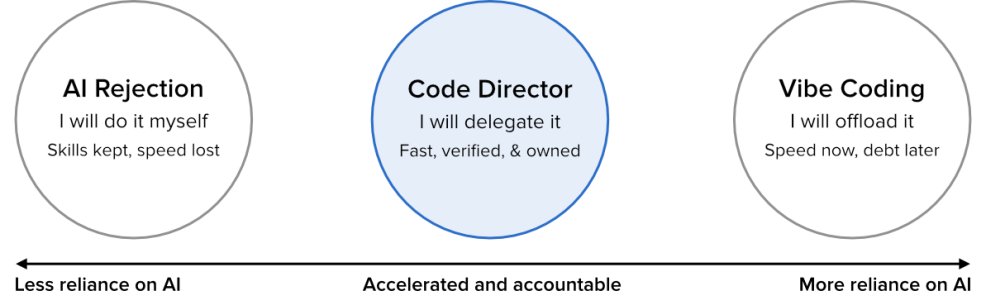
The Drop Times: Drupal 12 Upgrade Guide: Release Date, Requirements and Removed Modules
Metadrop: Drupal CLI in core finally landed in 11.4, how and why we got here
Drush is part of almost every serious Drupal project: it rebuilds caches, runs database updates, imports configuration and drives deployments. With Drupal 11.4, core ships its own command-line tool, dr, and the initiative behind it openly aims to replace Drush over time. The tool is still experimental, but the transition has started, and the parts of daily work that depend on Drush, especially CI/CD pipelines and remote operations, will not all move at the same pace. Knowing where things stand now avoids being wrong-footed later.
Drupal has depended on an external tool for its daily operations at a costDrush is the de facto CLI for Drupal. All CLI operations (rebuilding caches, running database updates, importing configuration, driving deployments) go through it, and it lives outside core. Core's own script, core/scripts/drupal, added in 2018 (#2911319), was not extensible and only shipped three built-in commands: quick-start, install and generate-theme.
…Gábor Hojtsy: Who would have thought the Drupal plural translation experience can be this much better?
Did you know that Drupal only learns how many plural variants a language has from imported .po files? It has a very fast lookup table to pick the right variant each time, but there is no UI to set or fix the rules. Get them wrong and your carefully translated strings fall back to the wrong form. Export your translations and the right plural rules don't come along either. I had a small module that provided a little bit of the solution since 2010 but recently decided to think bigger.
Gábor Hojtsy Thu, 10/22/2026 - 16:20Gspikes: Nonprofit Website Design: Lessons From 84 Nonprofit Drupal Projects
The Drop Times: DrupalCamp Italy 2026 Speakers Preview AI Migrations, Civic Platforms and Enterprise Security
PreviousNext: How we secured our clients’ Drupal sites with critical PHP security updates
Dynamosys Insights: PHP2Shell: Updating Drupal Won’t Fix These Critical PHP Flaws
Drupal has issued a security alert following the discovery of two critical PHP vulnerabilities. Patches are now available, and site owners should confirm that their hosting environment has received both fixes, even if Drupal itself is fully updated.
Drupal Association blog: Contribution credit updates: higher weights for core and core security work
We've changed how contribution credit is weighted on Drupal.org, and the changes are now live. If you watch the Drupal Marketplace you may have noticed some organizations shift position as a result; this post explains what changed and why, and what's still coming.
Two weights went up. Everything else stayed the same.
- Core issues are now worth a baseline of 15 credits each (previously 10). We're delighted at how strongly organizations have rallied behind strategic initiatives like Drupal CMS, Drupal Canvas, and Drupal AI. That's exactly what the credit system is meant to encourage. Those initiatives all stand on Drupal core, though, and we want to make sure the core team gets the fundamental care and feeding it deserves alongside them.
- Core security advisories now carry a 10x multiplier on top of that baseline, so a single core security issue is worth 150 credits (previously 50). The Security Team and core release managers are handling a growing volume of AI-generated reports, and we want organizations to have a strong reason to support, or join, that work.
- Unchanged: the minimum credit value is 1; credit scales with project usage (a project used on 300,000 sites earns 3 credits per issue); strategic initiative issues are worth 10 credits; and contrib security advisories remain at 5x the project's normal weight.
We've also expanded the core sponsorship table, which gives sponsors a guaranteed monthly base credit for supporting key roles whose most important work doesn't always happen in an issue. It now covers active Security Team Members, Subsystem Maintainers, and Topic Maintainers in addition to the core leadership roles already listed.
Next, we'll publish a companion table naming core contributors who are currently seeking sponsorship, so an organization that wants to fund core work can see exactly who to talk to. We'll post again when it's ready.
A note for Drupal Certified Partners: We check quarterly for partners who have qualified for the next tier and will upgrade you then, or upon request if you've seen yourself reach the next level in between our updates. We also don't downgrade partners until the end of their current term, so there's always time to shore up credit if needed. If you have questions about how these changes affect your organization's standing, get in touch with the Drupal Association.
Omega8.cc: The Ninety-Minute Recall
Darren Oh: Bring hands-on demos to your content with Drupal Forge
Marketing and training often ask people to imagine what a product or process can do. A screenshot, video, or live presentation helps. But there is a real difference between seeing a demonstration and trying it yourself. A hands-on demo makes marketing more effective: instead of only describing a product, you invite someone to try it. And it makes training more practical: a learner can move from reading instructions to exploring a practice environment.
Darren Oh Wed, 10/21/2026 - 15:03 Tags- Read more about Bring hands-on demos to your content with Drupal Forge
- Log in or register to post comments
Centarro: A Shared Cart Across Brands Is Only Half a Feature
When a company sells under several brands, someone eventually asks the obvious question: why can't customers put products from every brand into one cart and check out once?
It sounds like a small improvement to the shopping experience, but it isn’t a small feature. A shared cart between brands, on Drupal Commerce at least, is relatively easy, assuming each brand runs from the same Drupal installation.
But that’s only half of the story. What happens after the order is placed? The hard part of a shared cart experience is everything after checkout, especially fulfillment.
How the cart works by defaultIn a multi-brand Drupal Commerce setup, each brand gets its own store entity. A store holds a brand's commerce settings:
- Which merchant account takes the payment
- Which prices and promotions apply
- Which payment methods are available
Once something like Commerce Store Domain is installed and configured, a shopper's cart belongs to the store of the brand they're browsing.
Read moreGspikes: HIPAA-Compliant Website on Drupal: What It Actually Takes
Nuvole: PHP-first AI agents for Drupal, built on Neuron AI
We're introducing AI Neuron, a module that bridges Drupal with Neuron AI, a PHP framework for building agents, tools and multi-step workflows.
When you’re building AI features in Drupal, the AI module is the obvious place to start. It gives the whole site one place to configure providers and keys, and a default model for each kind of call.
Building an agentic solution means sequencing those calls into something that plans, decides what to do with a tool’s result, and calls another tool in response. The Drupal ecosystem already offers modules for that: AI Agents, ECA, the Tool API. Each gets you part of the way, but what’s left for the developer is gluing them together into one coherent solution. And that’s the hard part: each piece lives in its own module, configured on its own screen, in its own way, which makes iterating on the result, adjusting it, and evaluating it, slow.
What we wanted was one place to drive that development end to end, from a developer’s point of view: write the agent in PHP, iterate on its configuration quickly, and get real observability and evaluation, without ever leaving code to go configure something on a Drupal settings page.
Enter Neuron AINeuron AI is a PHP framework for building agents, tools and multi-step workflows. It handles the provider calls, the conversation memory, and the observability a run needs, so what’s left to write is the part specific to what your agent actually does.
Under the hood, five concepts drive it:
- Agent holds the conversation: give it a provider, instructions and a list of tools, and it takes a message, calls the model, calls a tool if the model asks for one, and keeps going until it has an answer.
- Tools are what an agent is allowed to do: a name and description the model reads to decide when to call one, the inputs it accepts, and the code that runs when it does.
- Workflow is the layer underneath all of this: a graph of nodes wired by the events they emit and accept. An agent is really just a workflow built for the common case of holding a conversation. Because it is a workflow, a run can pause to wait on a person and resume later, in a different request, which is what a step that needs a human’s approval needs.
- Chat history and memory keeps every conversation in a message store, from one scoped to a single request to one backed by a database that survives it. Once a thread grows past the model’s context window, the store trims the oldest messages to keep the next call from failing.
- Streaming sends the same four kinds of chunk no matter who’s listening: text, a tool call, a tool’s result, and reasoning where the model produces it. What changes is the adapter: it translates that stream into the shape a given consumer expects, the Vercel AI SDK’s protocol, the AG-UI protocol, or a channel that keeps delivering chunks after the request that started the run has already ended.
Reading the overview above, the shape of the integration seems obvious: translate each Drupal AI object into its Neuron equivalent, one for one. For providers, that’s exactly what happens. A Drupal AI provider becomes a native Neuron provider, and the site’s keys, default models and caching apply unchanged.
For tools and agents, we built something different. Neuron is a full framework in its own right, with its own tool-calling loop, its own memory, its own way of streaming and evaluating a run. Translating a Drupal tool or a Drupal agent into its Neuron equivalent would mean keeping two shapes in sync, and whatever came out the other end would still carry Drupal’s own assumptions into an object Neuron has to treat as entirely its own.
So instead, developers write Neuron objects directly, as Drupal plugins, with no translation step in between. A plugin is a factory for the agent, the tool or the workflow it declares, built fresh each time one is asked for: it reaches into Drupal, its service container, its permissions, whatever the site has configured, and uses all of that to build a native Neuron object.
What comes out is exactly what Neuron itself would build from its own API, with no Drupal shape to it, which is the point: Neuron can test it against its own fake providers and evaluate it with its own harness, with no idea Drupal was ever involved.
That division pays off later, too. When the AI module’s own tools and agents get bridged in, they’ll be built the same way: plugins that manufacture the native Neuron object itself.
What you don’t have to build: data persistence and loggingEvery agent and workflow a plugin manager builds also gets storage, persistence and logging for free, on top of the provider bridge above.
- Conversation storage: nothing to declare. Every message is a neuron_message entity row, keyed by the thread id, and already recording its own token usage. The entity is bundleable and fieldable, so a module that needs to track something else about a conversation extends the same entity with its own fields.
- Workflow persistence: every agent and workflow gets a durable record of its run, so it can suspend in one request and resume in another, which is what a human approval step or a queue-driven agent actually needs.
- Logging and observability: every run is tagged per agent and reported to the ai_neuron log channel.
That’s the original promise kept: iterate on the agent, while the storage, persistence, logging and provider connection around it stay fixed.
Manufacturing native Neuron objectsWith the ai_neuron module, Neuron’s three building blocks, agent, tool and workflow, become Drupal plugins.
As outlined above, a plugin is a factory for native Neuron objects: ask the related plugin manager for one by its id and get back a native Neuron object.
Here’s an example of a Drupal plugin that builds the matching Neuron object. Extend the base class and fill in the same methods you’d write against Neuron directly:
#[NeuronAgent( id: 'reporter', label: new TranslatableMarkup('Reporter'), )] final class ReporterNeuronAgent extends NeuronAgentPluginBase { protected function instructions(): string { return 'Summarize the content that changed.'; } }A tool is a plugin too. Declare its properties, then put the tool’s logic in __invoke():
#[NeuronTool( id: 'count_posts', description: 'Count the published posts of a content type.', )] final class CountPostsNeuronTool extends NeuronToolPluginBase { protected function properties(): array { return [new ToolProperty('type', PropertyType::STRING, 'The content type.', TRUE)]; } public function __invoke(string $type): string { // Count them and say so. } }A workflow is declared the same way: list the nodes it’s made of, and Neuron takes care of the rest:
#[NeuronWorkflow( id: 'edit_post', label: new TranslatableMarkup('Edit a post'), )] final class EditPostNeuronWorkflow extends NeuronWorkflowPluginBase { protected function nodes(): array { return [ new LoadPostNode($this->entityTypeManager), new ReviseNode($this->agents), new SavePostNode($this->entityTypeManager), ]; } }Each node declares, in its own method signature, the one event it accepts, but it can fire any event back. That’s the whole wiring: whichever node listens for the fired event starts next, with nothing left to configure by hand.
It also means a node can fire a different event depending on what it finds, starting a different node in response, which is what lets developers build workflows that branch and loop, as complex as they need.
Declaring these as Drupal plugins buys the usual things for free. The site discovers them with no manual registration, from any module that declares one, and a constructor asking for EntityTypeManagerInterface, or any other Drupal service, gets it through dependency injection like any other plugin.
Fetching and using one goes through its manager, which hands back a native Neuron object each time, a new one, because an agent carries the conversation it’s having:
$agent = \Drupal::service(NeuronAgentManagerInterface::class)->createAgent('reporter'); $agent->chat($message);From there it goes anywhere Neuron takes it, straight through Neuron’s own API: chat(), stream(), tools, middleware, chat history.
getNeuron() is the factory method behind all of this: it builds the native object, wiring in the provider, the tools, the error handler, whatever the plugin declared.
Overriding getNeuron() is the escape hatch, and it goes both ways. Drop in a hand-written Neuron agent, tool or workflow wholesale, and the base class configures nothing on top of it. That’s also the door for anything built outside Drupal entirely: NeuronHub, Neuron’s own package registry, publishes ready-made agents, workflows and toolkits, and any of them plugs into a site the same way, through the same override.
Try itThe easiest way to try it is to clone the repo and follow the instructions in its README.md: they set up a working site with the example module already enabled.
The ai_neuron_example submodule is a working agent you can talk to from the terminal: a Ghostwriter that writes blog posts for you. It ships a minimal Blog content type, three tools that create, list and edit posts, and an editing workflow of three nodes that the agent reaches through a tool, so one command exercises all three plugin types, plus structured output for the node that rewrites a post:
ddev drush ghostIt asks for a title and a body, and only invents them when you tell it to (“you decide”, “don’t ask, just create it”), in which case it writes whatever’s missing and creates the post in the same reply. Every event a run emits prints to the terminal as it happens, tool calls and workflow nodes included, so you watch a run happen live. The command also names the conversation it reopens, so you can leave it and pick it back up later, which is the conversation store’s work made visible.
What’s nextFive things are planned, in no particular order:
- Neuron tools derived from Tool API: one Neuron tool per tool plugin installed on the site, built from the typed inputs and JSON schema it already declares, so a tool written once is callable from a Neuron agent exactly as it already is from AI Agents, ECA, etc.
- Neuron agents derived from the AI module’s own agent plugins: one Neuron agent per configured AI Agents entity, usable as a step in a larger workflow.
- Evaluations, running Neuron’s own harness against agents the site already has.
- Channels, so a long-running agent can run in the background and stream its output to the UI through them, even after the request that started it has ended.
- Providers running both ways: a Neuron provider exposed as a Drupal AI provider too.
Tags: Drupal Planet, AI
- 1
- 2
- 3
- 4
- 5
- 6
- 7
- 8
- 9
- …
- nächste Seite ›
- letzte Seite »